

Build with Altana
Onboard users from browser wallets
createClient, createPasskeyWallet, and your users' own wallet via its standard EIP-1193 provider (plain viem or wagmi).How it works
The browser wallet and the Altana account play two different roles, and neither has to pretend to be the other:
| Role | Played by | Why |
|---|---|---|
| Funding source | The user's extension wallet (MetaMask, Trust Wallet, Rabby, …) | It already holds their assets, and sending to an address is something every wallet does. |
| Signing authority | A passkey (Face ID / Touch ID) | Extension wallets refuse the signatures a 7702 smart account needs — by design, as anti-drain protection. A passkey signs them natively, with no seed phrase. |
So the flow keeps the UX users know — connect, confirm a transaction in their own wallet — while the agentic account is born with a passkey admin. Every extension wallet speaks the same EIP-1193 provider interface, so one code path covers all of them; use wagmi's connector picker (EIP-6963) if you want a multi-wallet chooser UI.
The flow
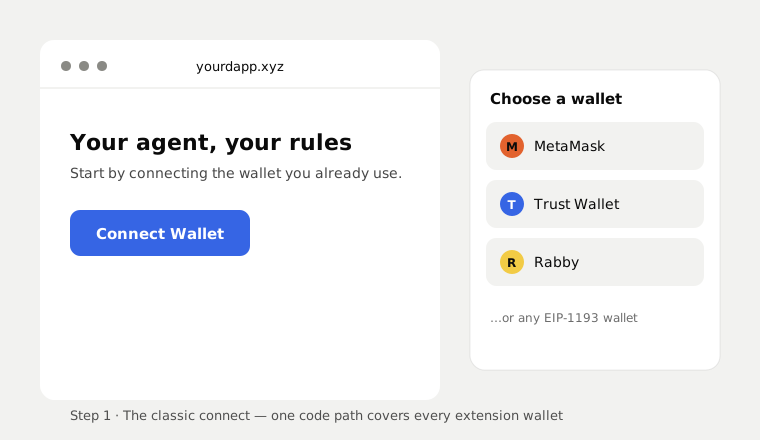
1. Connect the wallet they already have
The classic button. Nothing Altana-specific yet — this is standard viem (or wagmi).
import { createWalletClient, custom } from "viem";
import { bsc } from "viem/chains";
// Works for ANY injected wallet — MetaMask, Trust Wallet, Rabby, … —
// they all expose the same EIP-1193 provider. wagmi's useWalletClient /
// EIP-6963 picker hands you the same client with a wallet-choice UI.
const browserWallet = createWalletClient({ chain: bsc, transport: custom(window.ethereum!) });
const [funder] = await browserWallet.requestAddresses();2. Create the agentic account with a passkey
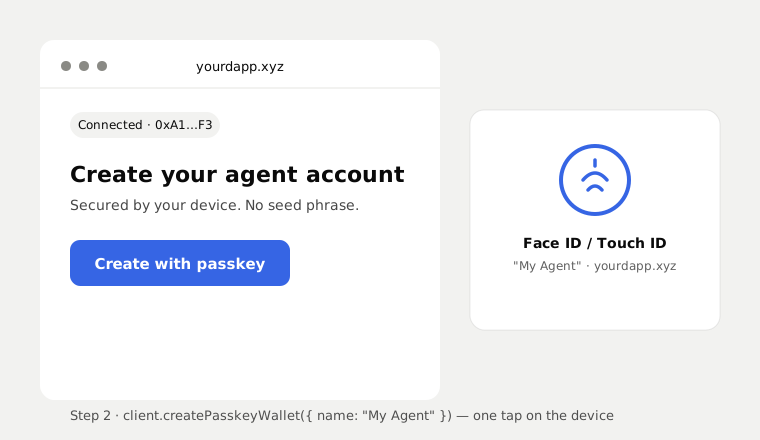
One SDK call. The user sees their device's Face ID / Touch ID prompt — no seed phrase, no extension involved.
import { createClient, BNB } from "@altananetwork/sdk";
const altana = createClient({ chains: [BNB] });
const wallet = await altana.createPasskeyWallet({ name: "My Agent" });3. Fund it in one click — no copy-paste
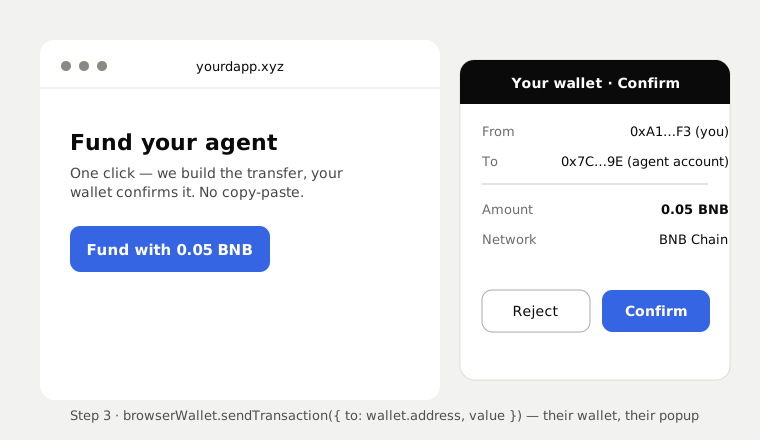
Because the extension wallet is connected, your dapp prebuilds the transfer and sends it through the user's own provider. They see one normal confirm popup in the wallet they trust.
import { parseEther } from "viem";
await browserWallet.sendTransaction({
account: funder,
to: wallet.address, // the new agentic account
value: parseEther("0.05"),
});Tokens work the same way — encode a standard ERC-20 transfer(wallet.address, amount) and send it through browserWallet.
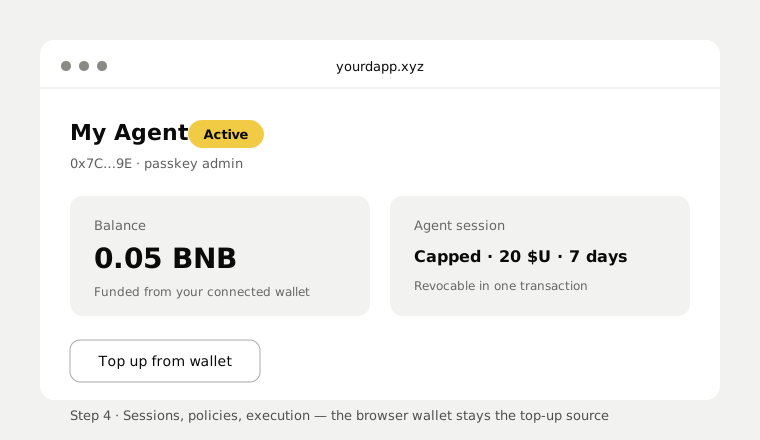
4. The agentic account takes over
From here it's the normal Altana lifecycle: grant a session with caps and expiry, let the agent execute, revoke in one transaction. The extension wallet stays connected for top-ups, and withdrawing back to it is a plain send from the Altana account.
Variants
- Keep the exact same address. A power user can export the private key from their extension wallet into
signerFromPrivateKey: because Altana accounts are EIP-7702, their existing EOA becomes the smart account — same address, same history, nothing to migrate. The trade-off: the key now lives with your app, not the extension, so treat custody accordingly. - Vault-and-allowance. For users who won't move anything: their extension wallet stays the vault, the passkey account is the working wallet they top up like a spending account, and session policies cap what any agent can do with it. This is the custody-conscious default.
What does not work (and why)
The extension wallet cannot BE the signer. SignerType is "privateKey" | "passkey" — there is no injected signer. An extension wallet withholds the two signatures a 7702 account requires: the delegation authorization (it hands the whole EOA to foreign code, so wallets only ever delegate to their own contracts) and raw 32-byte relay digests (the classic drainer primitive). This is the wallets' own security policy, not something Altana can change. MetaMask-owned smart accounts are an ERC-4337 pattern; Altana is 7702, where the account is the EOA, so the admin must be a key the SDK can sign with.
Related
- createPasskeyWallet — the account-creation call
- createWallet — funding and counterfactual accounts
- Errors — the unsupported-signer message, and what
FAILEDmeans